

Are you ready for a truth most new writers don’t hear enough?
Formatting is NOT what makes a screenplay great, and it’s definitely not the impossible monster everyone thinks it is.
Many beginners freeze the moment they open a professional script. Courier font everywhere, weird margins, dialogue blocks floating in the middle… it can feel like some elite secret code meant to keep newcomers out.
But here’s the myth-busting part: Screenplay formatting is NOT hard. It’s just a set of simple rules. Once you know them, everything opens up.
And that dream you’ve been holding onto, writing a real script, one that looks and reads like a pro wrote it?
You’re closer than you think.
You already have the ideas. The characters. The voice. The magic. All you need is the structure.
This guide will walk you through the essential formatting rules in the simplest way possible, and yes, you’ll also get a free professional template so you can start writing like a pro today. Let’s kill the fear and get your story on the page.
What Is Screenplay Format?
The screenplay format is the standardised way scripts are written so directors, actors, and crew can interpret them easily.
It includes:
- Font type and size
- Margins and layout
- Character name placement
- Scene headings
- Dialogue blocks
- Transitions
- Action descriptions
This universal structure ensures everyone working on the film understands the story the same way.
Why Proper Formatting Matters
Even a great story can be rejected if the formatting is sloppy. Professional formatting helps you:
1. Look Legit
Producers and readers can spot amateur formatting instantly, and they often stop reading.
2. Save Time on Set
Clear scene headings and action lines facilitate faster directing, blocking, and editing.
3. Control Pacing
Formatting affects rhythm. Short paragraphs create speed. Longer ones slow things down.
4. Make Your Script Easy to Read
Readable scripts keep readers engaged and emotionally connected.
Industry Standard Screenplay Formatting: The Basics
Before you start typing “FADE IN,” it helps to understand how the pros structure their scripts. Screenplay formatting isn’t about making your document look pretty; it’s about communicating with everyone involved in the filmmaking process.
Directors, producers, actors, cinematographers… they all rely on this standardised layout to do their jobs efficiently.
Let’s break it all down clearly.
1. Font and Layout
Professional scripts follow a strict layout for one main reason: timing. In the film world, 1 page in correct screenplay format equals roughly 1 minute of screen time. That estimate only works when your script uses:
- Font: Courier 12 pt
- Left Margin: 1.5 inches (leaves space for hole-punching and binding)
- Right Margin: 1 inch
- Top & Bottom Margins: 1 inch
Courier is the industry standard because every letter is the same width. That uniform spacing ensures consistent timing across scripts, whether they’re read on Final Draft, Celtx, or printed out in a meeting room.
2. Scene Headings (Sluglines)

Scene headings are like GPS coordinates for your story. They tell the reader exactly where we are and what time it is.
Format:
INT./EXT. + LOCATION + TIME
Examples:
INT. NAIROBI APARTMENT – NIGHT
EXT. CITY MARKET – DAY
They should be consistent. If you introduce a place as MAYA’S APARTMENT, stick with that name throughout your script. Consistency keeps your crew (and your reader) from getting confused.
3. Action Lines
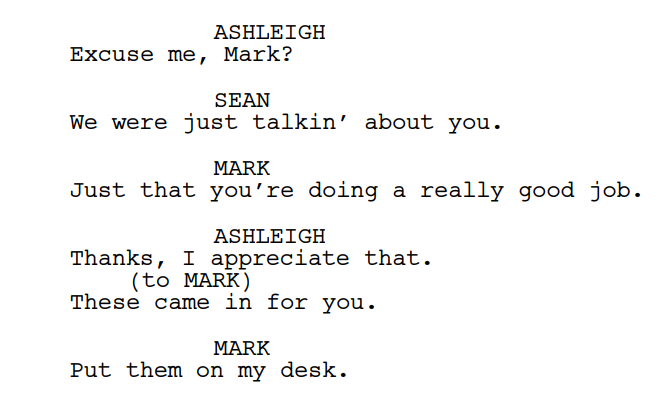
Action lines describe everything the audience can see and hear. This is where your directing skills shine, even if you’re not a director.
Rules to follow:
- Always write in the present tense
- Keep paragraphs short and visually descriptive
- Focus on what’s happening, not what characters think or feel internally
- Avoid unnecessary camera directions (like “PAN TO” or “ZOOM IN”) unless they’re essential
Example:
Maya rushes through the living room, tossing clothes into a half-open suitcase.
Great action lines feel cinematic without being overly wordy.
4. Character Names
Whenever a character speaks, format their name:
- In ALL CAPS
- Centred above their dialogue
- Consistent throughout the script
Example:
MAYA
If a character is introduced for the first time in an action line, write their name in ALL CAPS once there too.
5. Dialogue
Dialogue is centred on the page and should be:
- Clear
- Tight
- Emotion-driven
- Easy to speak aloud
One powerful rule to remember: Dialogue = intention + emotion.
If a line doesn’t reveal character, move the story forward, or create tension, it probably doesn’t belong.
6. Parentheticals (Use Sparingly!)
Parentheticals help clarify how a line is delivered, but only when the meaning isn’t obvious from context.
Example:
MAYA
(whispering)
Open the door… now.
Use them rarely. Too many parentheticals make your script feel micromanaged and disrupt the natural flow.
7. Transitions
Transitions appear on the far right of the page. They tell the editor, or reader, how one scene moves into the next.
Common transitions include:
- CUT TO:
- FADE IN:
- FADE OUT.
Most modern scripts use transitions sparingly. Unless a transition adds meaning or clarity, it’s better to let the story flow.
8. Subheaders (Mini-Sluglines)
Subheaders are used within a scene when you want to shift attention to a new area without creating a full scene heading.
Example:
KITCHEN
Maya flips through a stack of unpaid bills.
These keep your scenes smooth and visually organised without breaking them into separate locations.
9. Shots (Only When Needed)
Shot descriptions, like CLOSE ON, WIDE SHOT, or ANGLE ON, are powerful, but they should be used with precision.
Writers usually add shots only when:
- Something important needs emphasis
- A prop or detail must be seen clearly
- The shot conveys the meaning that action alone can’t
Example:
CLOSE ON the blood-stained locket in Maya’s hand.
If overused, shots can make your script feel like a technical manual rather than a story.
10. Screenplay Length Guidelines
While page count varies by genre, here are standard industry expectations:
- Feature Film: 90–120 pages
- Short Film: 3–20 pages
- TV Drama (1 hour): 45–60 pages
- TV Comedy (30 minutes): 22–32 pages
And here’s the real secret: professionals care more about pacing than numbers. If your story is tight, engaging, and visually clear, it will read like a professional script regardless of whether it’s 92 pages or 118.
Free Screenplay Template (Copy & Use Immediately)
Below is a clean starter template you can paste into Google Docs or Final Draft.
FADE IN:
INT. COFFEE SHOP – DAY
Rain lashes the windows. The place is nearly empty.
JESSICA (30s, once put together, now unravelling) sits alone, clutching a crumpled letter like it’s the last life raft on the Titanic.
MARK (40s, cheap suit, cheaper cologne)
slides into the booth opposite her.
MARK
You look like hell.
JESSICA
Good to see you too.
Mark signals the WAITRESS — early 20s, bored out of her skull.
MARK
Two coffees. Black.
(to Jessica)
You weren’t supposed to find that letter.
Jessica finally meets his eyes. Something dangerous flickers there.
JESSICA
Too late.
CUT TO:
EXT. COFFEE SHOP – DAY
Jessica bursts out into the storm. Mark watches through the glass, unmoving.
FADE OUT.
THE END
Common Screenplay Formatting Mistakes to Avoid
- Too much dialogue
- Camera angles on every line
- Over-describing action
- Using the novel’s writing style
- Not capitalising sound effects or important first appearances
- Inconsistent character names
- Avoiding white space (scripts must breathe)
A great rule: If it doesn’t help the reader visualise clearly, remove it.
Beginner-Friendly Tips to Write Like a Pro
Focus on what we can SEE and HEAR.
Film is visual. Keep thoughts and backstory minimal.
Use strong verbs.
“Rushes,” “slams,” “trembles” are words that paint movement.
Keep dialogue snappy.
Realistic, short, emotional.
One action idea per paragraph.
Short paragraphs keep scripts readable.
Always format consistently.
Readers love clean scripts.
Conclusion
Learning screenplay formatting is one of the most powerful steps you can take toward becoming a professional screenwriter.
With the right structure, your ideas flow better, your story becomes cinematic, and your readers stay hooked from page one to FADE OUT.
Use the free template above, keep practising, and keep improving your storytelling craft.
If you want more templates, guides, and scriptwriting tips, visit iWayThrills for resources that help you write like a pro.